
Company: Limbix is a digital therapeutics startup on a mission to make mental health treatment accessible to young people who need it the most, when they need it the most. In 2023, Limbix was acquired by digital therapeutics company, Big Health.
Product: SparkRx is a digital therapeutic that provides an evidence-based adjunct treatment intervention for adolescents aged 13-22 with symptoms of depression. SparkRx was offered for a limited time, at no cost to patients or providers, under the FDA’s Enforcement Policy during the COVID-19 public health emergency.
Designed with clinical experts in adolescent depression, SparkRx brings evidence-based treatment to each patient’s smartphone, delivering a multi-week program based on cognitive behavioral therapy (CBT) and behavioral activation protocols.
Role: At Limbix teams were organized into product development “pods” comprised of Product Management, Clinical Science, Content Design, Product Design, UX Research, Engineering and Data Analysis team members. I was the Content Design lead embedded on the Spark pod and worked collaboratively with these cross-functional partners.
The problem: SparkRx is an adjunct treatment used under the supervision of a healthcare provider. Due to increased demand from providers that offer Spark, a new companion platform was born – the Limbix Provider Portal. The Portal allows providers to view their patients’ progress in the program, get a more detailed breakdown of their Patient Health Questionnaire scores (a self-administered tool to measure depressive symptoms), and more. However, the initial design did not include a way for providers to interact with their patients during the course of their Spark journey, creating a disconnect between provider and patients. Additionally, our program adherence and engagement metrics were not where we wanted them to be. This presented an opportunity for us to allow providers to actively partake in their patient’s Spark journey via the Provider Portal while improving user engagement and adherence to the program.
The goal: Create an opportunity for healthcare providers to engage with their patient’s through the Provider Portal. Encourage users to adhere to the program and actively engage with Spark’s lessons and activities to help improve treatment outcomes. The solution should be non-disruptive to the user’s progress in the program, a light lift for providers, and should not compromise the patient’s safety.
My contribution: The Provider Portal and Spark pods worked in close collaboration for this project – particularly myself and the Provider Portal content lead. While they focused on the feature enhancements to the Provider Portal, I managed the content updates to the Spark app. The final solution took approximately 4 weeks to develop.
The solution: Given the many constraints we had to work with, including safety and provider workflow concerns, we determined the best solution would be pre-written, one-way messages for providers to send to their patients.
- Nudges: A “nudge” is a pre-written message that a provider can send from the Provider Portal. Depending on the user’s progress in the app and/or their level of inactivity relevant nudges appear on the provider’s portal. They can optionally select a pre-written nudge to send to the user. If their provider sends a nudge, the user receives a push notification prompting them to check the Spark app to view the message. Nudges can be viewed from a message center in the app.

Tutorial: Nudges are a new feature for existing users of SparkRx – a concise tutorial was developed to bring awareness to the feature update.
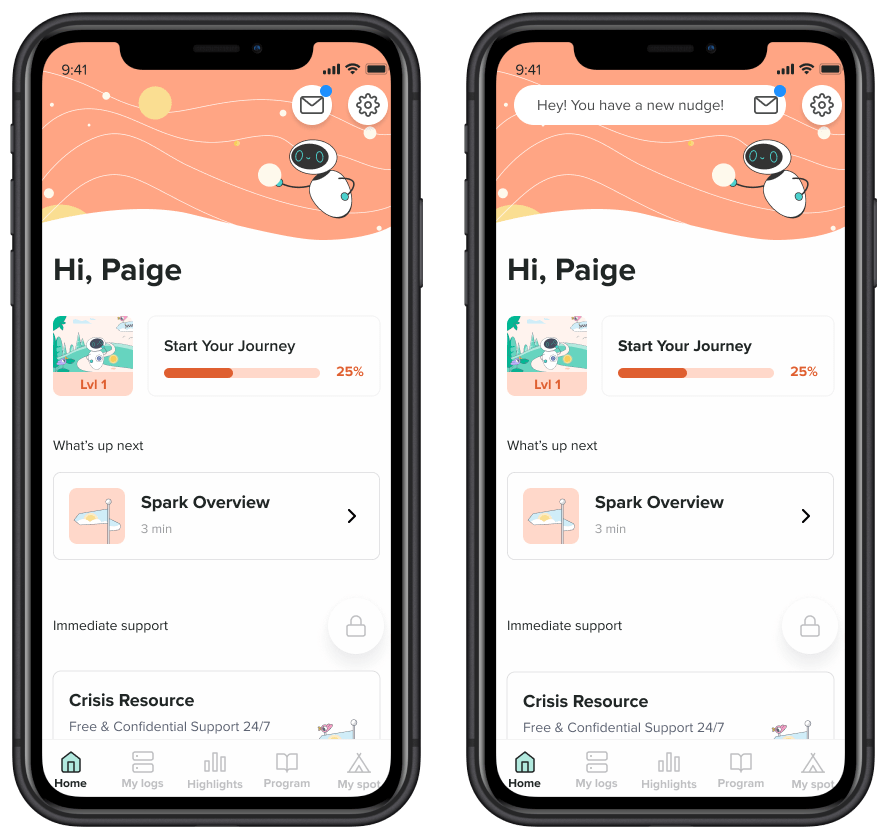
Home With Nudge Center: The first time a provider sends their patient a nudge icon will appear on their home screen. The badge expands to alert the user of the new nudge, then collapses. The blue dot also indicates there is a new unread message available.
If the user has push notifications enabled then they will also receive a notification when a new nudge is available.
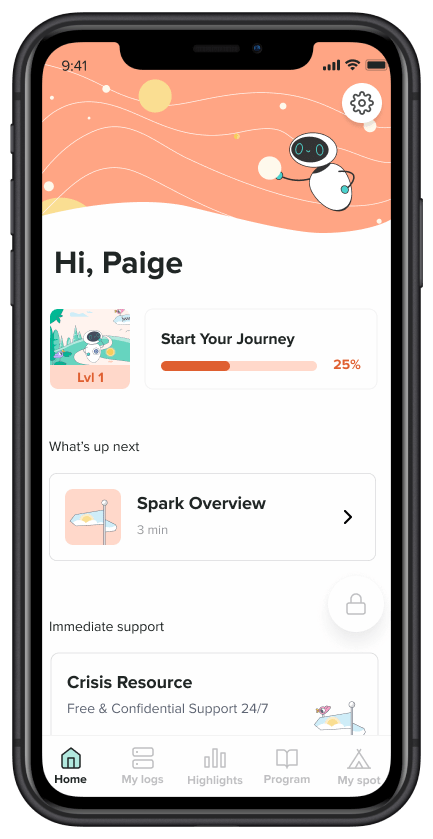
Home Without Nudge Center: If the user’s healthcare provider never sends them a nudge then the nudges icon will never appear on their Spark home screen.

Nudge Center: New and old nudges populate in this nudge center. Users navigate to this page via the nudge icon on the home screen.
Users are unable to respond to nudges. To adhere to safety and legal guidelines, we included labeling that instruct the user to contact their provider directly if they need to contact them.
Note: Nudge placeholder language has been included for privacy reasons.
 Tuba Karim