
Company: Limbix is a digital therapeutics startup on a mission to make mental health treatment accessible to young people who need it the most, when they need it the most. In 2023, Limbix was acquired by digital therapeutics company, Big Health.
Product: SparkRx is a digital therapeutic that provides an evidence-based adjunct treatment intervention for adolescents aged 13-22 with symptoms of depression. SparkRx was offered for a limited time, at no cost to patients or providers, under the FDA’s Enforcement Policy during the COVID-19 public health emergency.
Designed with clinical experts in adolescent depression, SparkRx brings evidence-based treatment to each patient’s smartphone, delivering a multi-week program based on cognitive behavioral therapy (CBT) and behavioral activation protocols.
Role: At Limbix teams were organized into product development “pods” comprised of Product Management, Clinical Science, Content Design, Product Design, UX Research, Engineering and Data Analysis team members. I was the Content Design lead embedded on the Spark pod and worked collaboratively with these cross-functional partners.
The problem: Content within SparkRx builds upon itself with many activities resurfacing throughout the program. This allows the user to practice the skills they’ve learned. Due to the compounding and highly repetitive nature of the program, it can take time for users to feel a sense of progress on their Spark journey.
One major pain point that surfaced repeatedly in user research was a feeling of being “frustrated” or “blocked” by the linear structure of the app, and overwhelmed by the quantity of blocking practice tasks like mood logs and behavioral activations (BAs). Many users said all this added up to the app feeling less engaging and more like “homework.”
The first level of the program in particular was a significant obstacle, requiring users to complete 9 mood-activity logs in order to move forward. Some users, typically younger teens, also found the instructions in the mood-activity tracking task difficult to follow. These factors combined led to frustration and discouragement. We lost over 50% of users in the first level of the app and 25% dropped off before reaching the first piece of psycho-educational content. Providers also provided feedback that it took “too long” for users to begin feeling progress, and they would often lose motivation and drop out of the program.
The goal: Show users the progress they have made earlier in the program to encourage level completion. Reduce friction and blockage in the first level, without sacrificing clinical efficacy. Provide additional guidance within the mood-activity task.
My contributions: I was the content design lead on the project and worked closely with the product team, including the program’s clinical and design leads during and after our design sprint. I actively participated in the ideation and selection of solutions, then designed the final solution. The entire process took about 1.5 months, from the design sprint to finalizing designs. The SparkRx product team collaborated closely throughout the entire process.
The solution: We determined that one solution alone would not resolve the multiple issues identified, so we opted for a multi-pronged approach.
- Reduce friction: To address the feelings of blockage in level 1 we started off by decreasing the number of required mood logs
- Side Quests: Practicing this skill is still an important component of the clinical recipe, so we designed a new feature for users to optionally log more mood activities
- Reminders: This feature was added to encourage users to complete their Side Quest(s).
- Mood-activity tracking prompts: Required mood logs were redesigned into prompts, providing users with more guidance during the activity
- Insights: A page created to show the correlation between activities and patterns in users’ behaviors. Seeing these patterns allow users to see the progress they’ve made.
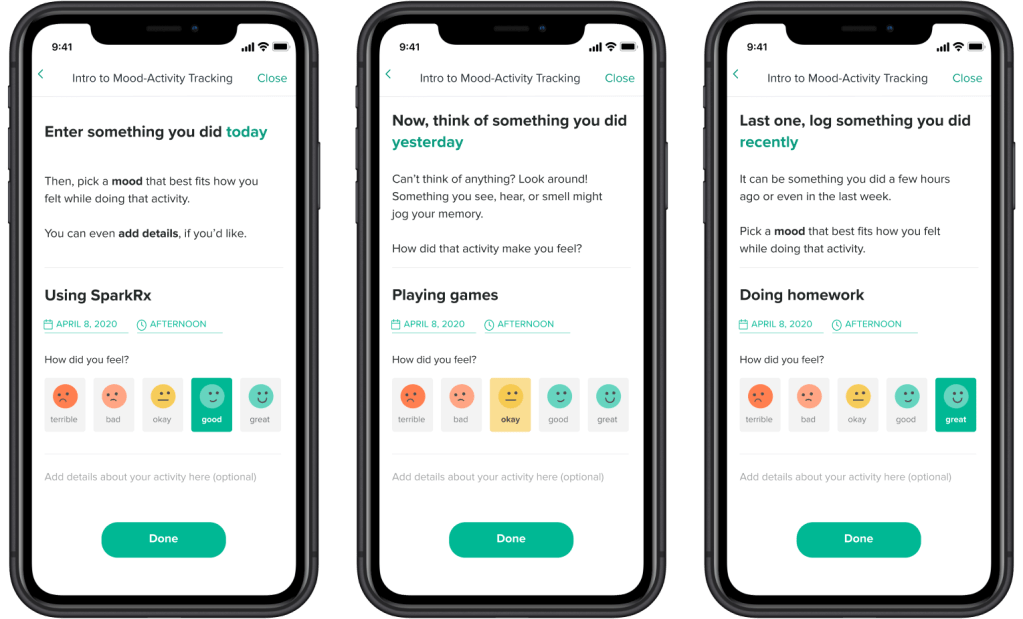
Mood-Activity Tracking: Prompts that guide users through the mood-activity task in Level 1 of the program. This is a required task that teaches the skill of mood-activity logging.
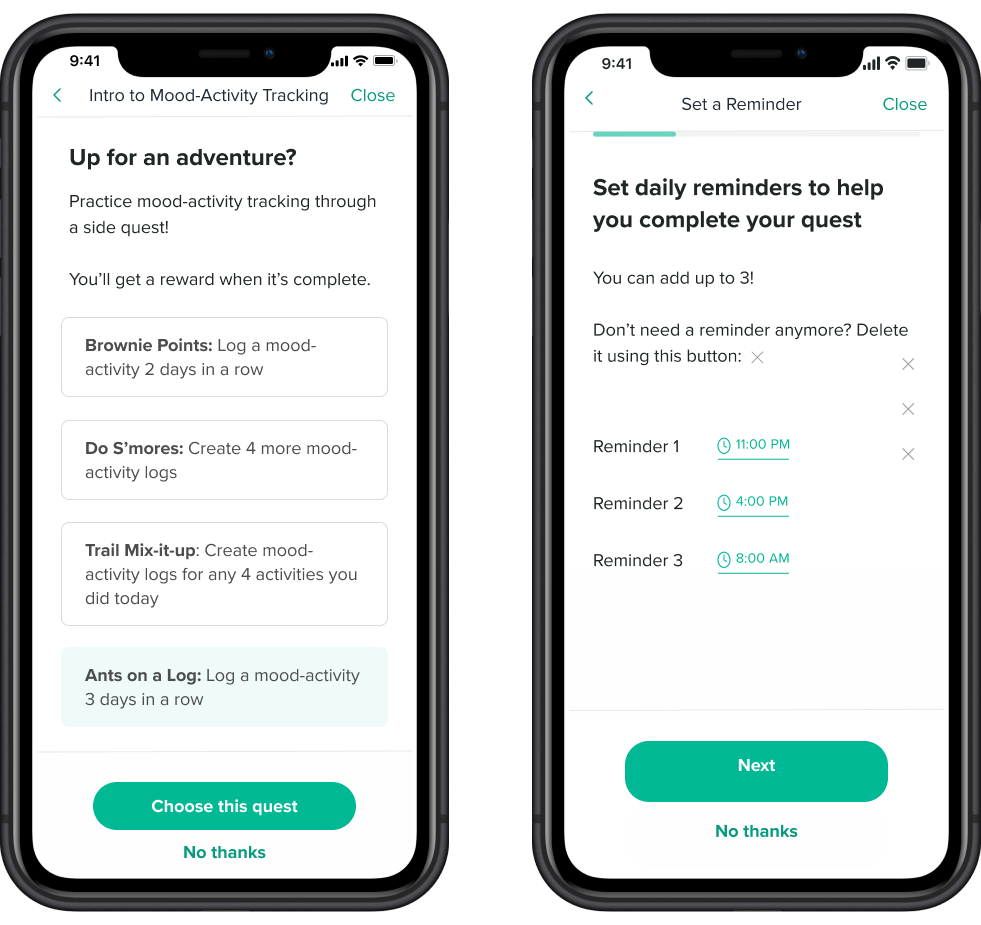
Side Quests: An optional practice task for users to practice mood-activity logging. Selected Side Quests live on the home screen of the app, so users can revisit their quest at any point while continuing onto Level 2.
Reminder: Users can set up to 3 custom reminders to complete their quest. Reminders appear as app push notifications.
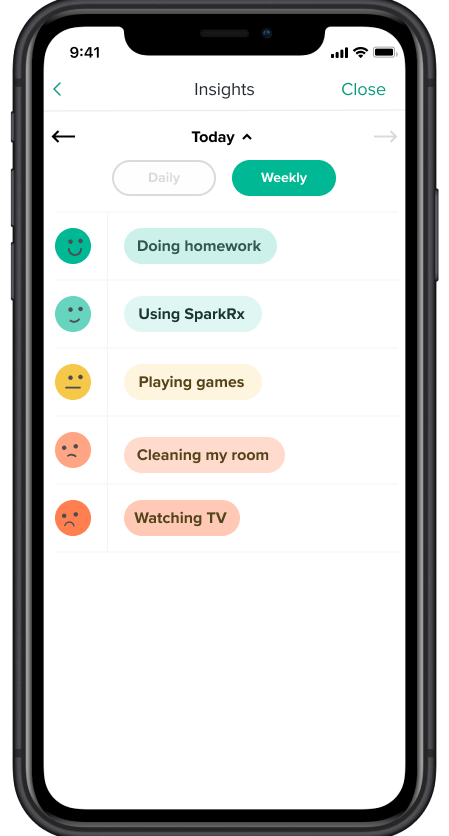
Insights: This feature lives in the Highlights tab of the app where the user can view the activities they have logged and any patterns between their moods and activities. Users are shown this screen after they have competed their required mood logs and are able to resurface it as many times as they wish from the home screen.
 Tuba Karim